
The first version of this pipeline ended with me typing aws lambda invoke and a browser client that only existed as a diagram. Both of those changed. The operator now signs in to a manager page, and viewers watch on a real site hosted on GitHub Pages. Getting there took one new Lambda, an HTTP API, Cognito, and a CORS bug that every curl test passed and a large share of browser requests failed.
What changed since part one
Part one described a pipeline that takes a private recording, transcodes it into HLS with MediaConvert, and publishes a static catalog behind CloudFront. That core didn’t change. Every addition sits at an edge of it, either where the operator starts work or where a browser reads the result. The list below gives the five pieces and why each one exists.
- Amazon Cognito user poolNewIdentity for the operator
Admin-created users sign in and get a JWT. There is no self-registration.
- API Gateway HTTP APINewFive routes behind a JWT authorizer
The browser calls it directly, and API Gateway rejects any request without a valid token before Lambda runs.
- ManagerApi LambdaNewOne router for the manager page
It lists recordings, edits catalog metadata, and hands start and cleanup work to the existing functions.
- CloudFront Function and CORS gateFixConstant CORS headers, checked before publishing
Every response carries CORS headers, and FinalizeVideo refuses to publish a video a browser could not read.
- StreamVaultNewPublic player on GitHub Pages
A static React site that reads the catalog and plays HLS from CloudFront.
The before and after fits in one picture. On the left is the operator flow from part one. On the right is the same pipeline with the new doors around it. The processing nodes in the middle are identical on both sides.
Only one new Lambda showed up. ManagerApi is a thin front for the functions that already existed, and that choice shapes most of this post.
The system now
The architecture has five boundaries where part one had four. There is an admin plane that runs on my machine, an API layer in AWS, the unchanged processing core, a CloudFront edge that now runs a function, and a public client on GitHub Pages. The diagram below is the full map, and it replaces the architecture diagram from part one.
One edge in that diagram is easy to miss. FinalizeVideo now reads through CloudFront before it writes the catalog. That loop exists because of the CORS incident later in this post, and it’s the only change inside the processing core.
The manager page
The CLI flow worked, but it had costs I kept paying. Every run needed AWS credentials on my laptop, a hand-written JSON payload, and a video ID I had to remember. The manager page keeps the same operations and adds a login, input validation, and a confirmation step for anything destructive. It’s a React and Vite app that runs only on the local dev server.
The flow moves in one direction, from sign-in to a published video. The one step the page can’t speed up is MediaConvert, which still takes as long as it takes.
- Sign in
- Pick a recording
- Submit the job
- MediaConvert runs
- FinalizeVideo publishes
- Edit or remove
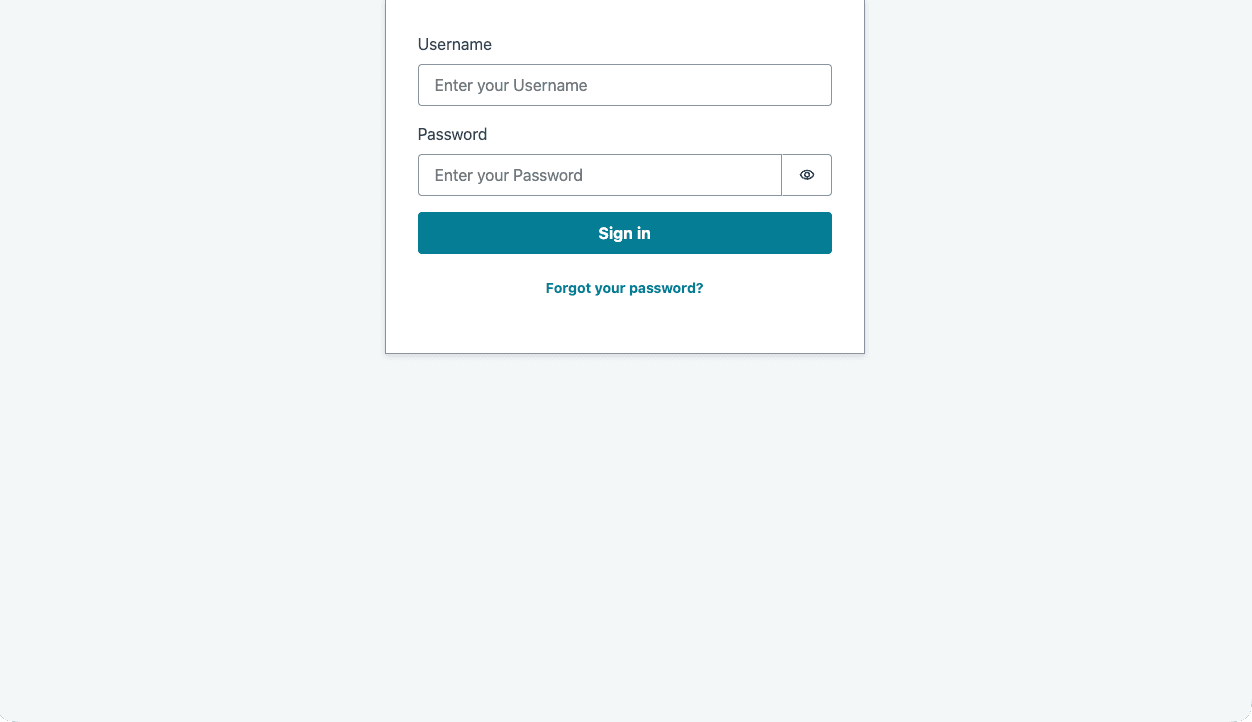
The sign-in screen is the Amplify UI Authenticator component with sign-up hidden. There is no “create account” link because there is nothing to sign up for. An administrator creates users in the Cognito console.
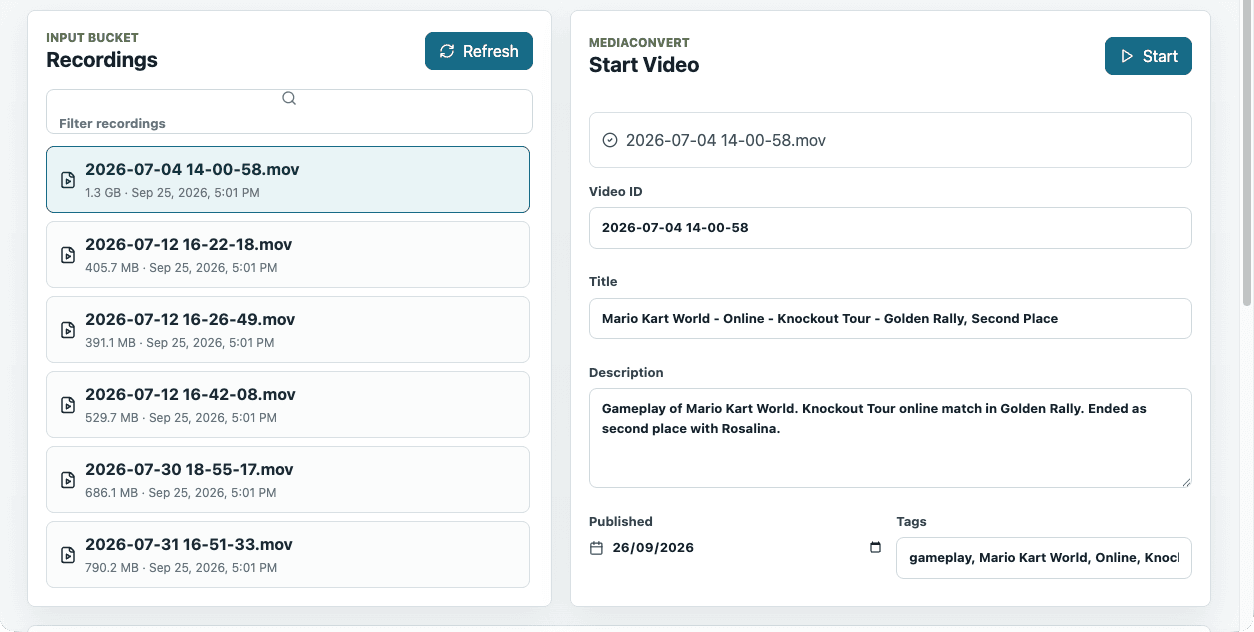
After sign-in, the left panel lists source files from the input bucket’s recordings/ prefix, with size and upload time. Selecting one fills the source field of the start form. The operator adds a video ID, a title, a description, a publish date, and tags, then presses Start.
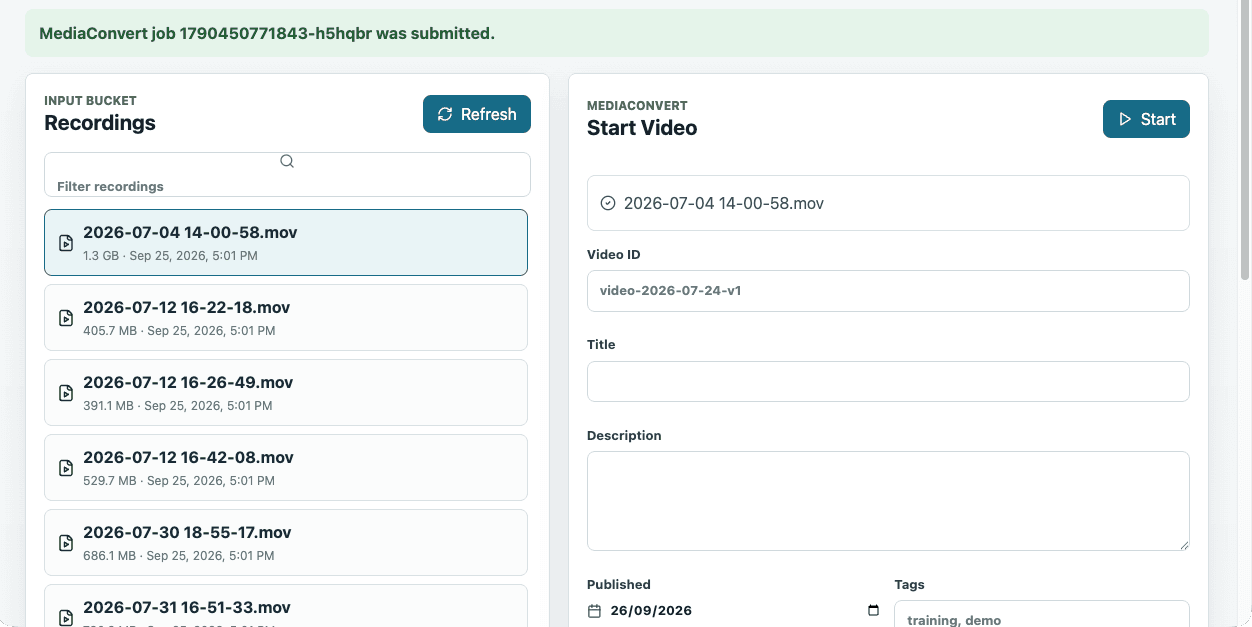
The response comes back fast, and all it confirms is that a MediaConvert job exists. The banner shows the job ID and the form resets. Publication still waits for EventBridge to deliver the COMPLETE event to FinalizeVideo, exactly as it did in part one, so a new video only reaches the catalog once the job finishes.
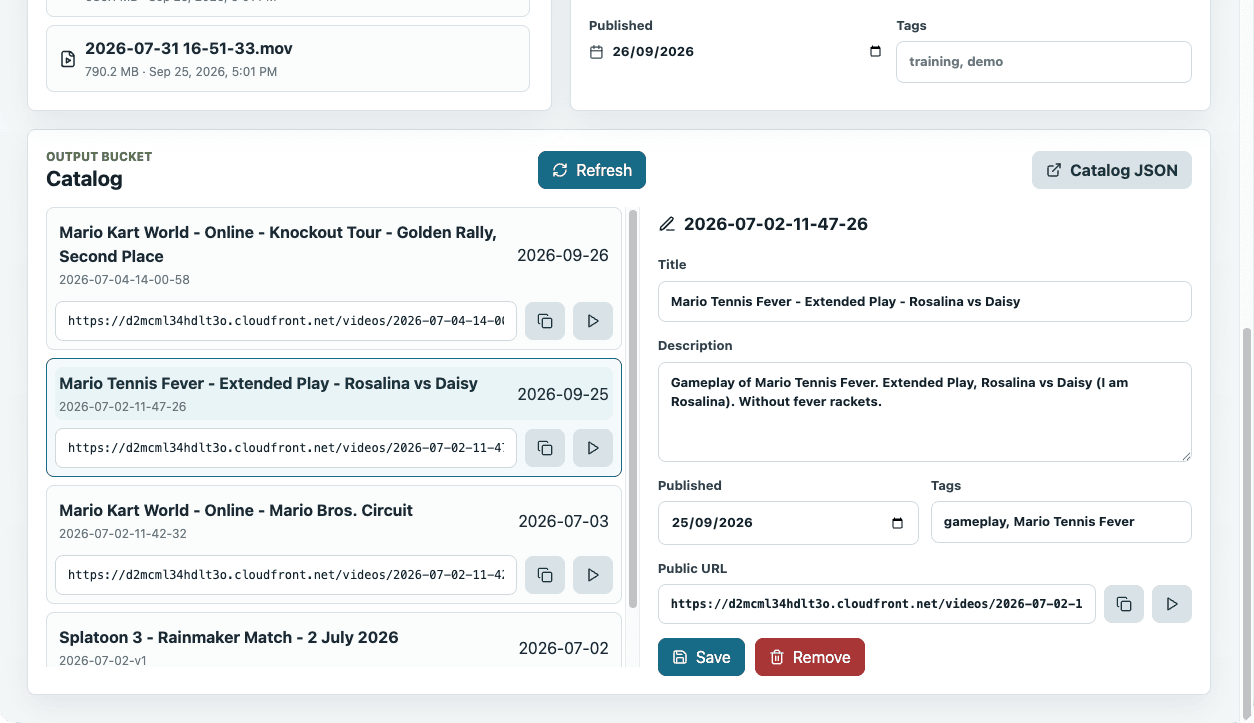
Below the forms sits the catalog. Each entry shows its title, ID, publish date, and public playback URL with copy and play buttons. Selecting an entry opens a metadata editor for title, description, date, and tags. The Remove button opens a panel that asks for the video ID typed out in full before it deletes anything.
The play button opens a drawer with an hls.js player pointed at the same CloudFront URL that viewers use. That’s a quick sanity check before sharing a link, and it also meant the manager page ran into the same CORS rules as any other client.
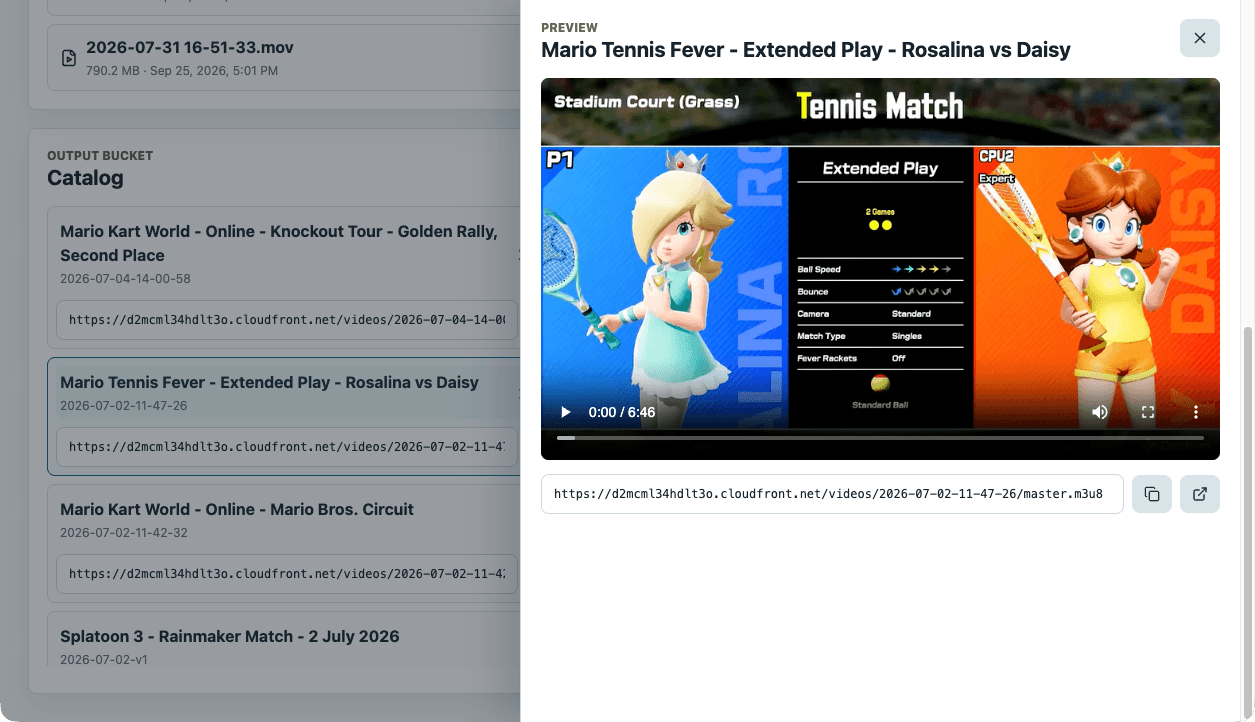
The page also leaves some things out on purpose. It can’t upload recordings, so large files still go to S3 through the console or CLI. It can’t delete source recordings. It can’t call FinalizeVideo either, because that function should only react to real MediaConvert events. Each of those limits keeps the page’s permissions smaller than the CLI’s.
Authentication with Cognito and a JWT authorizer
The Cognito app client uses the single page application type. That makes it a public client with no secret, which is the only honest option for code that ships to a browser. Sign-in uses email, self-registration is disabled, and email is the only required attribute. Cognito makes sign-in identifiers and required attributes hard to change later, so I kept both minimal.
The SPA signs in, receives tokens, and sends the access token as a bearer header on every call. API Gateway’s JWT authorizer checks the issuer and audience before the Lambda runs, so a request with a bad token is rejected without costing an invocation.
I picked an HTTP API over a REST API because the JWT authorizer is built in and the cheaper, lighter API type covers everything this needs. There are no usage plans, API keys, or request transforms here. Throttling is still available on an HTTP API, and it’s worth setting so a double-clicked Start button can’t queue two jobs.
One Lambda, five routes
ManagerApi answers every route of the API. It’s a single Python function on arm64 with 128 MB and a 30-second timeout. The table lists the routes with the status each one returns on success.
| Method | Route | What it does | Success |
|---|---|---|---|
GET |
/recordings |
Lists .mp4, .mov, and .mkv under recordings/ |
200 |
GET |
/catalog/videos |
Reads catalog/catalog.json from the output bucket |
200 |
PATCH |
/catalog/videos/{videoId} |
Edits title, description, date, or tags | 200 |
POST |
/videos/start |
Invokes StartVideo |
202 |
POST |
/videos/cleanup |
Invokes CleanupVideos |
200 |
Cleanup is a POST and not a DELETE because CleanupVideos takes a batch of IDs and supports dry runs, and neither fits a delete on one resource. The start route returns 202 because the job was accepted, and nothing is published yet.
One router Lambda instead of five small ones was a deliberate trade. There is one IAM role to reason about, one log group to tail, and one deploy. The cost is coarser permissions, since every route shares the same role. That’s acceptable here because every route serves the same single admin audience. With more user types, I’d split the function along those lines.
The start and cleanup routes don’t reimplement anything. StartVideo already knows how to validate a source key, check that the output prefix is empty, and load the MediaConvert template. ManagerApi invokes it synchronously and passes its answer through, so there is still exactly one place that decides whether a job can start.
def _invoke_json_lambda(function_name: str, payload: dict[str, Any]) -> dict[str, Any]:
    response = lambda_client.invoke(
        FunctionName=function_name,
        InvocationType="RequestResponse",
        Payload=json.dumps(payload).encode("utf-8"),
    )

    raw_payload = response["Payload"].read().decode("utf-8")
    result = json.loads(raw_payload) if raw_payload else {}

    if response.get("FunctionError"):
        error_message = result.get("errorMessage") or f"{function_name} failed."
        raise ApiError(400, error_message)

    return result
When StartVideo rejects a request, its error message becomes the 400 body, and the manager page shows it in the status bar. Any unexpected exception becomes a plain 500 with “Internal server error” so stack traces stay in CloudWatch. The function logs one structured JSON line per request, completed or rejected.
A few small checks do most of the input hygiene. The recordings prefix is forced under recordings/ and rejects .. segments. Page size is capped at 100 keys. The PATCH body accepts only four fields and refuses unknown ones, so id, durationMs, and playbackUrl can never change through the API.
Three writers, one JSON file
Part one ended with a caveat. FinalizeVideo wrote the catalog without an ETag check, and I said I’d revisit that before adding a public admin UI. The admin UI arrived, and with it a third process that writes catalog/catalog.json. The manager’s metadata edits therefore use S3 conditional writes.
The loop is optimistic concurrency with no new service. Read the catalog and its ETag, apply the patch, re-sort, bump version, then PutObject with IfMatch set to that ETag. When the catalog doesn’t exist yet, the write uses IfNoneMatch: * instead. A PreconditionFailed means someone else wrote first, so the function reads again and retries, up to three attempts.
If three attempts all conflict, the API returns 409 and the UI asks for a retry. For one operator editing a handful of videos, that’s plenty, and DynamoDB would be overkill. It becomes worth it when writes get frequent or viewers need queries beyond “newest first”.
The fix isn’t complete. FinalizeVideo still writes without a precondition, so in the race above it could overwrite a manager edit that landed between its own read and write. The window is small, and CleanupVideos and ManagerApi both guard their writes. The last writer still needs the same loop.
The new role is the smallest one
ManagerApiLambdaRole has three statements on top of the basic logging policy. It can list the input bucket only under recordings/. It can get and put one object, the catalog file, by exact ARN. And it can invoke exactly two functions, StartVideo and CleanupVideos. It has no MediaConvert access, no iam:PassRole, and no delete permission anywhere.
Those limits hold because the API borrows the other roles’ privileges instead of holding them. To start a job, it asks StartVideo, which holds the pass-role permission. To delete outputs, it asks CleanupVideos, which holds the delete permission. A stolen manager token can do what the page does and nothing more.
The other half of the wiring is a Lambda resource policy that lets apigateway.amazonaws.com invoke ManagerApi, scoped by source ARN to this one API. Without it, the authorizer passes and the integration fails with a permissions error that looks like a Lambda bug.
CORS broke twice
CORS gave me more trouble than every other part of this project. The first failure happened on localhost while I built the first test player. The second happened weeks later on the public site, after I thought the first fix had settled it. They’re the same class of problem with two very different causes.
Round one, curl works and hls.js doesn’t
The symptom was confusing. Opening the master.m3u8 URL in a tab worked and returned 200. The same URL loaded by hls.js failed with net::ERR_FAILED 200 (OK). So the request succeeded, and the browser then refused to let JavaScript read the response.
The explanation is that a top-level navigation isn’t a cross-origin read. When hls.js fetches the manifest from another origin, the browser needs an Access-Control-Allow-Origin header on the response before it hands the body to the script. Without a readable master playlist, hls.js can’t find the renditions, so it finds no quality levels and never requests a segment.
It helps to split this into two separate questions, because each one has its own mechanism and they fail independently.
The first fix added an S3 CORS rule for GET and HEAD from any origin, plus the managed CORS-S3Origin origin request policy so CloudFront would forward Origin to S3. A bucket CORS rule doesn’t make a bucket public. Block Public Access and Origin Access Control still decide who can read it. Playback on localhost started working, and I moved on.
Round two, the cache remembered who asked first
On 2026-09-28 the public site started failing in a strange pattern. Some videos played and others didn’t. A failing video failed every time, and a working one kept working. The browser console showed the familiar “No ‘Access-Control-Allow-Origin’ header” error, even once for catalog.json.
The root cause was the cache key. S3 CORS and the managed response policy only add CORS headers when the request carries an Origin header. The distribution used Managed-CachingOptimized, and Origin is not part of that cache key. Whoever requested an object first decided which headers were cached for everyone. A curl without Origin, a direct navigation, or a health check stored a copy without CORS headers, and browsers were then served that copy.
Each video has hundreds of files, including the master, the rendition playlists, and every segment. One bad cached object is enough to break a video, which is why failures looked random. The managed response policy should have patched the header on a cache hit, and on the failing objects it only did so for a bare curl with Origin. Adding any other request header, as every browser does, made the header disappear. I never isolated why.
That detail is also why the bug was hard to see. A curl -H "Origin: ..." crawl passed on about a thousand objects. The repo’s own troubleshooting guide recommended that exact command. The diagnosis only moved once I stopped trusting curl and tested in a real browser.
- Read the CloudFront and S3 configuration, which matched the docs
- Crawled all six videos with curl and Origin, and every object passed
- Fetched six files from six videos in a real browser, and many failed
- Noticed a missing path returned a readable 403 while cached objects did not
- Bisected curl headers until the CORS header disappeared
The fix makes the header constant instead of trying to vary the cache correctly. A viewer-response CloudFront Function runs on every response, cached or not, and sets the CORS headers without looking at the request.
function handler(event) {
  var headers = event.response.headers;
  headers['access-control-allow-origin'] = { value: '*' };
  headers['access-control-allow-methods'] = { value: 'GET, HEAD' };
  headers['access-control-expose-headers'] = { value: 'ETag, Content-Length, Content-Range' };
  headers['access-control-max-age'] = { value: '3600' };
  return event.response;
}
I tried a response headers policy with these as custom headers first, and CloudFront rejected it because they’re CORS headers. The policy’s own CORS section depends on the request, which was the original problem. So a function was the only way to get unconditional headers. I removed both managed policies, invalidated /videos/* and /catalog/*, and 37 browser-loaded URLs that had mostly failed all loaded.
Making the bug unpublishable
Fixing the edge only covers today’s configuration. If someone edits the distribution in the console next month, the same failure could come back quietly. The cheapest place to catch that is the moment before a video enters the catalog, so FinalizeVideo now checks what a browser would see before it publishes.
On a COMPLETE event, after it confirms master.m3u8 exists, the function fetches through CloudFront. It reads the master, every rendition playlist, and the first and last segment of each rendition. The requests carry browser-like headers, including Origin, Referer, Cache-Control, and Sec-Fetch-Mode, because a bare Origin is the test that hid the bug. Any non-200 response or missing CORS header fails the check.
A failed gate logs CorsVerificationFailed with the offending URLs and raises, so the video never appears in the catalog. Once the edge is fixed, re-sending the same event publishes it. A VERIFY_CORS=false variable turns the gate off, and the check has its own unit tests. As a side effect, the gate’s requests fill the cache with good copies before any viewer arrives.
The same crawl exists as scripts/check-cors.sh for the whole catalog. It sends the same kind of headers and fails loudly on the first bad object. For now I run it by hand, and scheduling it is on the open list below.
StreamVault, the client part one only described
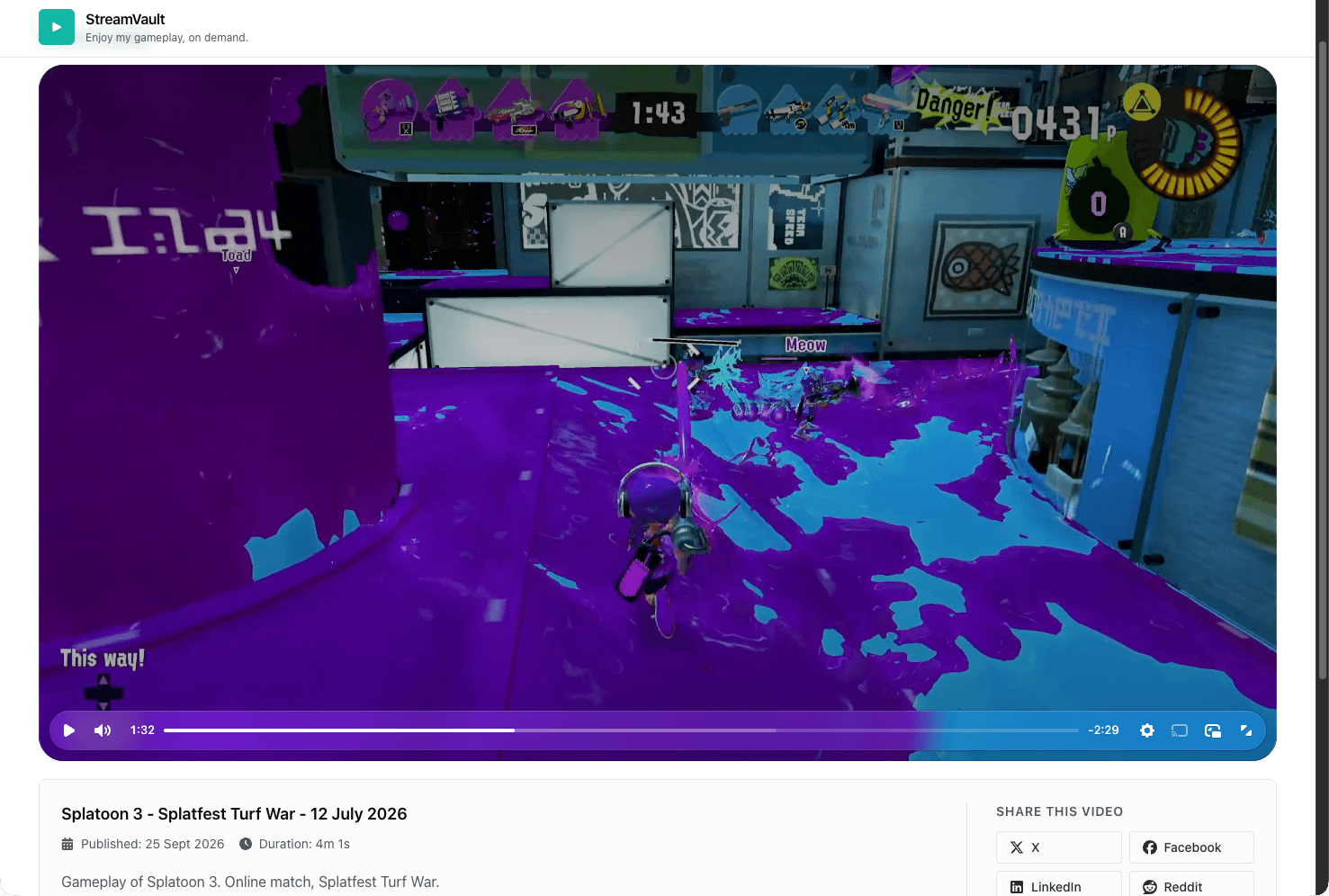
Part one had a client architecture diagram for a browser app that didn’t exist yet. StreamVault is that app. It’s a static site on GitHub Pages that lists my gameplay recordings, filters them by game and by online or offline play, and plays them with Video.js and hls.js.
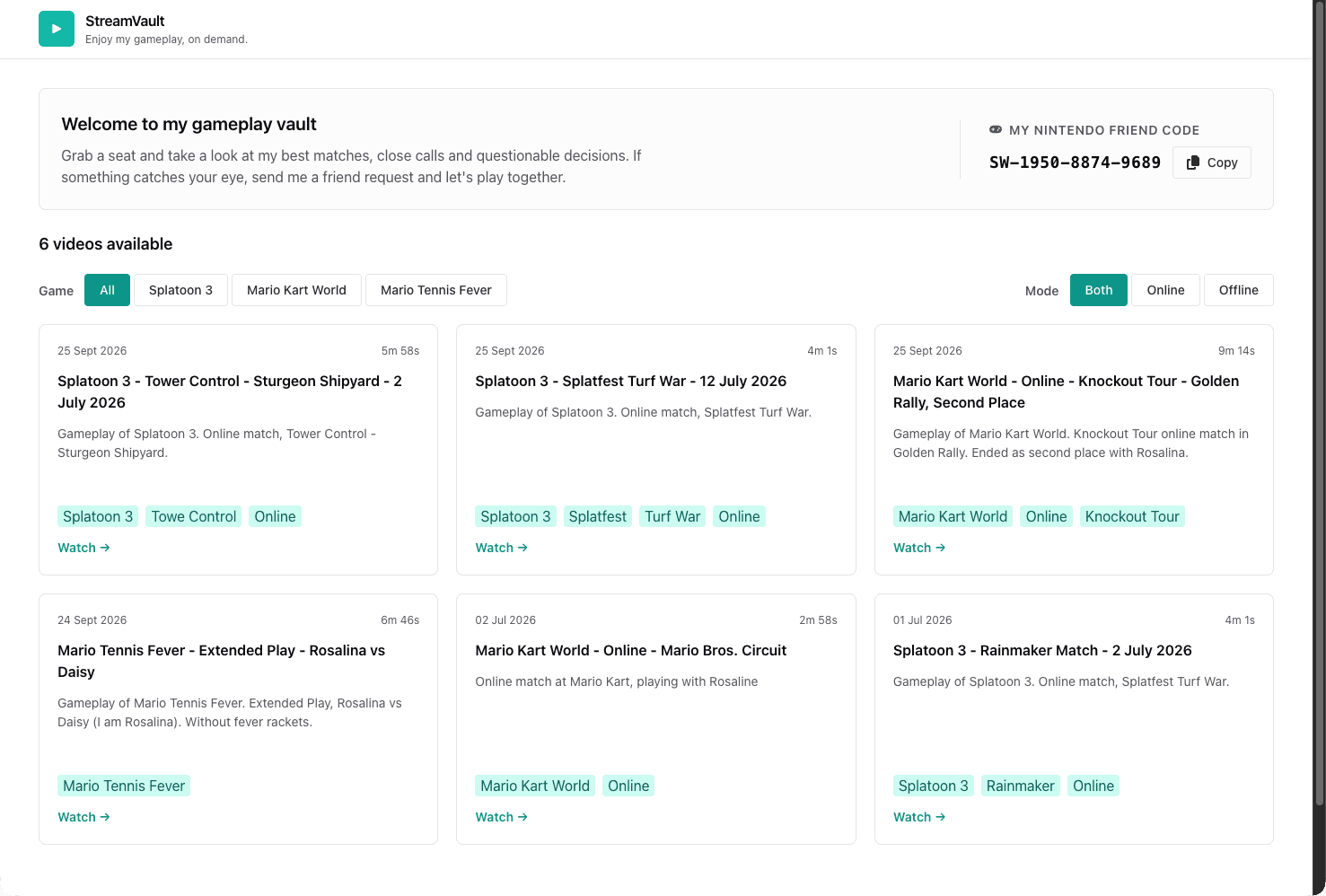
The stack is Vite, React 19, and TypeScript, with Chakra UI v3 for styling and react-router for two routes. The player route is lazy-loaded, so hls.js and Video.js only download when someone opens a video. Vitest and Testing Library cover the catalog parser and components, and oxlint handles linting. There’s no server because the backend already publishes everything as static files.
Loading the catalog without trusting it
The catalog loader expects failure. It fetches catalog.json with an eight-second timeout and runs the result through a strict parser that checks every field of every video. A missing durationMs or a malformed date rejects the whole payload instead of rendering half a card. On any failure, the app falls back to a copy of the catalog bundled at build time.
The fallback mattered during the incident. When catalog.json itself was served without CORS headers, the site still showed a grid instead of an error page. Playback was still broken for some videos, but the page stayed usable.
The dev proxy that hid the bug
In development and vite preview, a proxy maps /cdn/* to CloudFront, and a small toSameOrigin helper rewrites CDN URLs to that path. Every request is same-origin, so CORS never comes into play. In production there is no proxy on GitHub Pages, and the app calls CloudFront directly.
That’s convenient for local work, and it’s also why round two only showed up in production. The dev server never made a cross-origin request, so it couldn’t fail the way the published site did. A local mode that calls the real CDN origin directly would have exposed the problem before any viewer did.
GitHub Pages quirks
GitHub Pages serves the site as a project site under /stream-vault/, so Vite’s base is set to match. Pages has no SPA fallback, which means a cold load of /stream-vault/video/some-id hits GitHub’s 404. A small 404.html redirects to the home page. A hash router would avoid that, but I preferred clean URLs over zero-404 deep links.
Two clients, one catalog
The manager page and StreamVault have no code in common. What connects them to the publisher is the catalog JSON shape, and the table compares how each client uses it.
| Concern | Manager page | StreamVault |
|---|---|---|
| Audience | One operator | Anyone |
| Hosting | Local Vite dev server | GitHub Pages |
| Authentication | Cognito JWT | None |
| Reads catalog | Through the API, from S3 | From CloudFront |
| Writes catalog | Metadata only, with ETag checks | Never |
| CORS surface | API Gateway, localhost only | CloudFront function, any origin |
| Player | hls.js | Video.js with hls.js |
The shape is small enough to show in full. FinalizeVideo writes it, the manager edits four of its fields, and StreamVault validates all of them before trusting a single entry.
{
  "version": 9,
  "updatedAt": "2026-09-26T20:09:22.190890Z",
  "videos": [
    {
      "id": "2026-07-02-11-47-26",
      "title": "Mario Tennis Fever - Extended Play - Rosalina vs Daisy",
      "description": "Gameplay of Mario Tennis Fever. Extended Play, Rosalina vs Daisy (I am Rosalina). Without fever rackets.",
      "publishedAt": "2026-09-25",
      "tags": ["gameplay", "Mario Tennis Fever"],
      "durationMs": 405750,
      "playbackUrl": "https://d2mcml34hdlt3o.cloudfront.net/videos/2026-07-02-11-47-26/master.m3u8"
    }
  ]
}
What’s still open
The system works end to end, and viewers can watch every published video. A few loose ends are still worth writing down before I forget them.
- A scheduled CORS crawl, as an EventBridge schedule plus a Lambda plus an alarm, would catch configuration drift between publishes. Today the check only runs when a video publishes or when I run the script.
- The CloudFront distribution is still changed by script and console. It should live in infrastructure as code with the rest of the resources.
FinalizeVideoneeds the same ETag loop the other two writers already use.- The committed
StartVideopolicy still namesMediaConvertVideoRoleforiam:PassRolewhile the service role isMediaConvertVodRole, the mismatch part one pointed out. Jobs submit fine, so the deployed policy differs from the file, and the repo copy should be corrected. - Hosting the manager page would need a new CORS origin on the API, new Cognito callback URLs, and MFA turned on.
The core didn’t move
S3, StartVideo, MediaConvert, EventBridge, and FinalizeVideo do the same jobs they did in part one, apart from the new publish check. Everything else went around them. The operator got a login and a small API, and viewers got a site to watch on. The part that cost me the most time had nothing to do with video. It was a CORS header that depended on Origin and a cache key that ignored it.